# How to deposit into vaults?

Step 1. Go to the “Earn” page and select a staking vault you want to deposit into.

<figure><img src="https://1929738449-files.gitbook.io/~/files/v0/b/gitbook-x-prod.appspot.com/o/spaces%2FPvNiR05Zs3bt0WtkDJtl%2Fuploads%2F2BG4ZdPteyjOAQlulKOa%2FStaking%20step%201.png?alt=media&#x26;token=9e173b91-97ed-4572-bd8c-8fc6bd082d09" alt="" width="293"><figcaption></figcaption></figure>

Step 2. Enter the amount of $CORGIAI you want to deposit, and click “Next & Review”.

<figure><img src="https://1929738449-files.gitbook.io/~/files/v0/b/gitbook-x-prod.appspot.com/o/spaces%2FPvNiR05Zs3bt0WtkDJtl%2Fuploads%2FJ3eOzfhpgJ9qEQ8zYO6u%2FStaking%20step%202.png?alt=media&#x26;token=475d0524-0486-436d-8705-684797ed8d98" alt=""><figcaption></figcaption></figure>

Step 3. Review the staking details, then click “Confirm & Stake Now”.

<figure><img src="https://1929738449-files.gitbook.io/~/files/v0/b/gitbook-x-prod.appspot.com/o/spaces%2FPvNiR05Zs3bt0WtkDJtl%2Fuploads%2FvOZ3FD3mPB3UIYUicPxo%2FStaking%20Step%203.png?alt=media&#x26;token=79c51d23-d4b8-4a45-8a52-b7813765bc16" alt=""><figcaption></figcaption></figure>

Step 4. Review the transaction details on your wallet and approve the transaction.

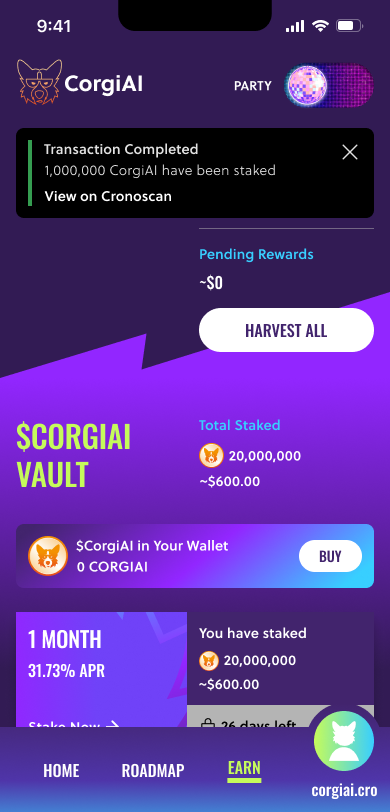
Step 5. You have successfully staked the $CORGIAI into our staking vaults!

<figure><img src="https://1929738449-files.gitbook.io/~/files/v0/b/gitbook-x-prod.appspot.com/o/spaces%2FPvNiR05Zs3bt0WtkDJtl%2Fuploads%2Ffsyi41Jn0SVYLnJgS8tk%2FStaking%20Step%204.png?alt=media&#x26;token=b063a91f-2eb7-496d-b1f8-ae80c02f45af" alt=""><figcaption></figcaption></figure>

<br>